
10 Min. ReadWhat We Actually Like (and Don’t Like) About the Industry’s Most Popular Design Programs
At SCAPES, landscape design software is the backbone of nearly everything we do. We use multiple programs every week across residential landscape design, outdoor living projects, lighting plans, planting plans, construction drawings, and photorealistic presentations.
The reality is this:
There is no “perfect” landscape design software.
Every platform has strengths, weaknesses, ideal use cases, and frustrating limitations. Some are incredible for fast concept development. Others are better for construction documentation. Some look beautiful but become painfully slow on real-world projects.
This guide breaks down the best landscape design software platforms into two categories:
Industry-specific landscape design software
General architectural/design software commonly used in landscape design
We’ll cover:
Cost
Ease of use
Rendering quality
Design efficiency
Construction drawing capabilities
What we like
What we don’t like
Best use cases
Industry-Specific Landscape Design Software
These programs are built specifically for landscape designers, landscape contractors, outdoor living companies, and landscape architects.
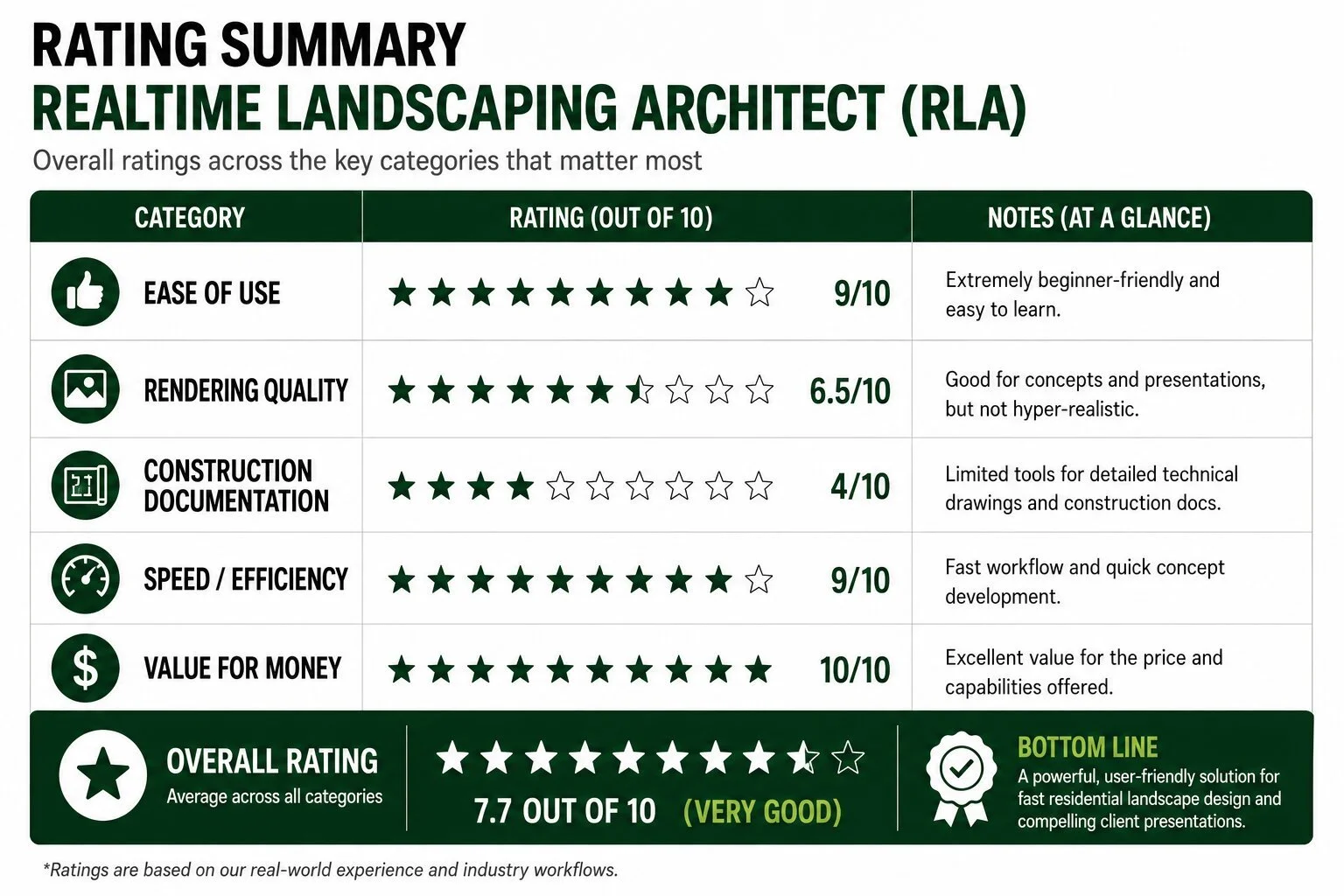
1. Realtime Landscaping Architect
Approximate Cost
~$400–$600 ONE-TIME PURCHASE
Ease of Use
Extremely beginner-friendly
Best For
Landscape contractors
Quick residential concepts
Sales presentations
Entry-level landscape design businesses
What We Like
Realtime Landscaping Architect is probably the easiest professional-looking landscape design software to learn in the industry.
For contractors that need:
quick concepts,
fast revisions,
simple walkthroughs,
and homeowner-friendly visuals,
…it’s hard to beat for the price.
The drag-and-drop workflow is intuitive, and you can create decent-looking residential backyard concepts surprisingly quickly.
It’s especially good for:
patios,
planting layouts,
pools,
lighting concepts,
outdoor kitchens,
and basic residential master plans.
The learning curve is dramatically lower than most CAD or modeling programs.
What We Don’t Like
The biggest limitation is precision and scalability.
Once projects become more complex:
grading,
large retaining wall systems,
detailed construction plans,
advanced hardscape detailing,
or highly customized geometry,
…the software starts to feel restrictive.
Rendering quality can also feel “video game-like” compared to modern photorealistic rendering engines.
Construction documentation is limited compared to CAD-based workflows.
2. Structure Studios VIP3D
Approximate Cost
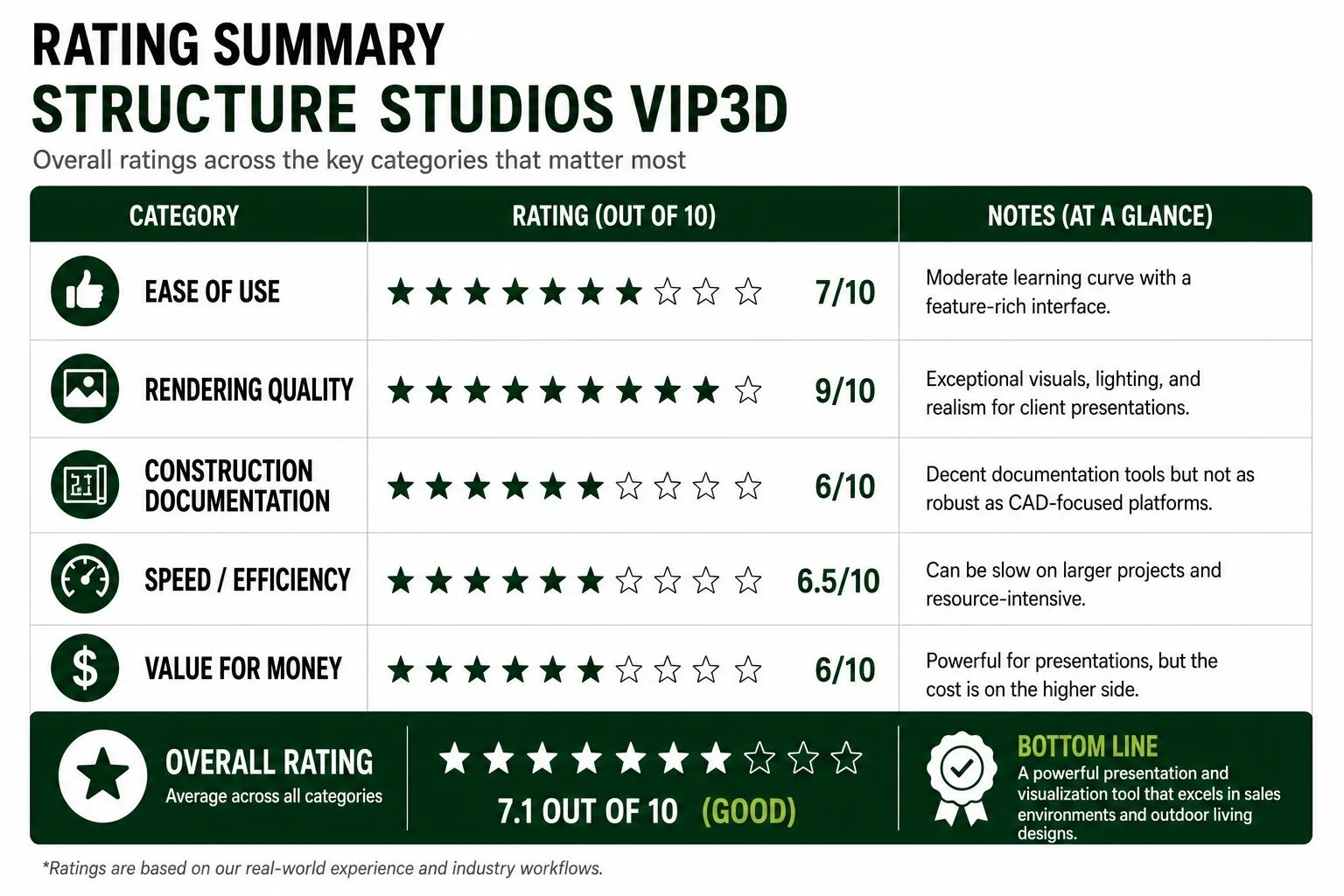
$2,364 PER YEAR
Subscription and upgrade costs can add up
Ease of Use
Moderate learning curve
Best For
Pool companies
Outdoor living designers
High-end residential visualization
Sales-focused design firms
What We Like
VIP3D produces some of the best client-facing visuals in the landscape industry.
The software excels at:
pools,
outdoor living spaces,
luxury backyards,
outdoor kitchens,
pergolas,
fire features,
and nighttime lighting scenes.
The presentation side is excellent.
Homeowners respond extremely well to:
immersive walkthroughs,
flyovers,
animated environments,
and highly polished presentations.
For design-build sales, it can be incredibly effective.
What We Don’t Like
The software can become slow and clunky on larger projects.
It’s also fairly resource-intensive, requiring strong computer hardware for smooth operation.
The biggest downside for us is that while visuals are strong, actual production/construction workflows can feel less efficient than more technical CAD platforms.
Planting workflows and construction detail workflows are not as refined as some professional CAD systems.
3. PRO Landscape
Approximate Cost
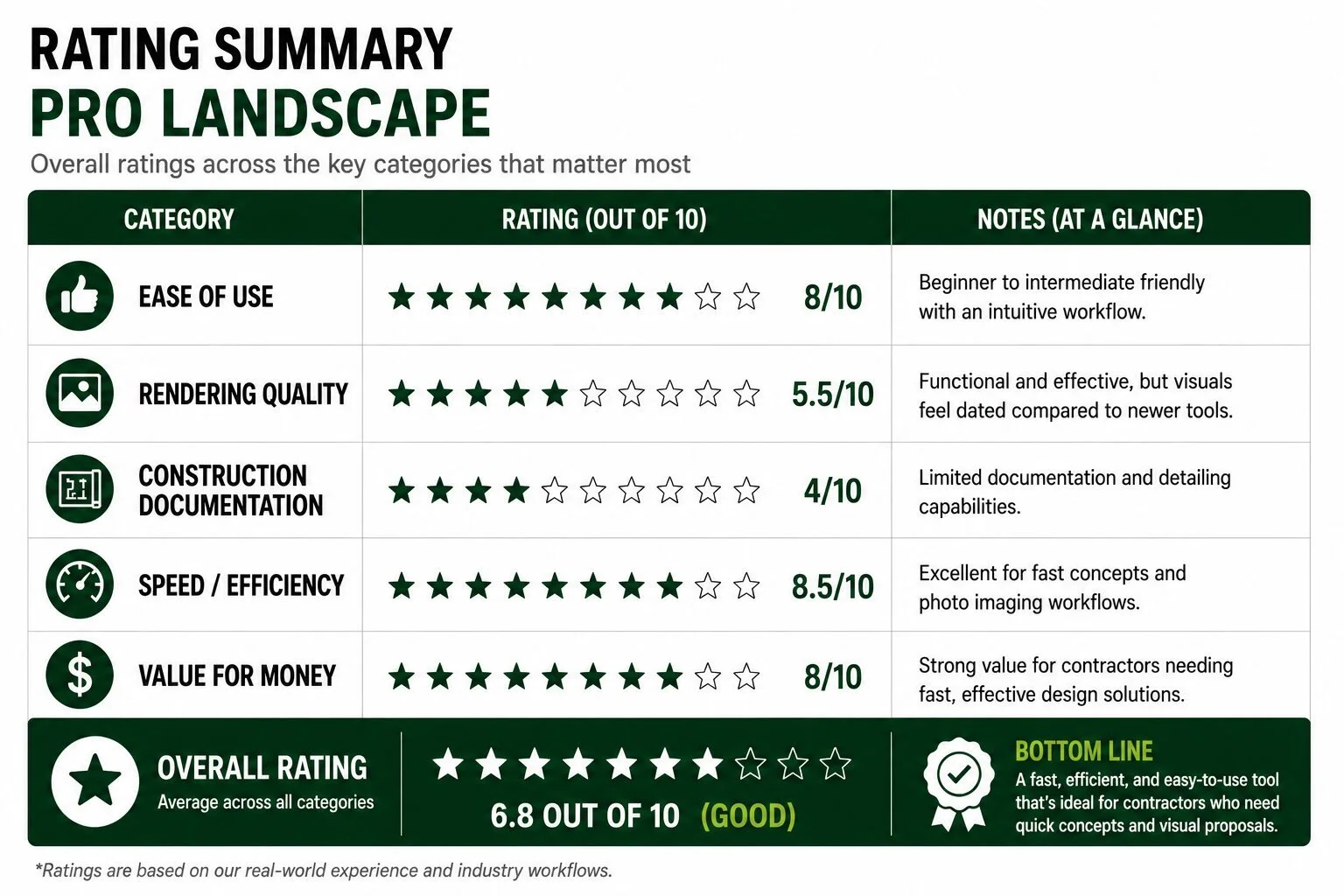
$900–$1,080 PER YEAR
Ease of Use
Beginner to intermediate
Best For
Landscape contractors
Fast photo imaging
Sales presentations
Design-build companies
What We Like
PRO Landscape is extremely efficient for fast sales concepts.
Its photo imaging tools allow contractors to quickly:
edit photos,
add plantings,
add patios,
add walls,
and create visual concepts without fully modeling projects in 3D.
That speed matters.
For many landscape companies, faster concepts mean:
more estimates,
faster sales cycles,
and more closed jobs.
The plant database is also extensive and useful.
What We Don’t Like
The rendering engine feels dated compared to newer visualization software.
The interface can also feel somewhat old-school.
For high-end modern presentation standards, the visuals may not compete with more advanced rendering workflows.
Construction documentation capabilities are also fairly limited.
Non-Industry-Specific Design Software
These programs were not built specifically for landscape design — but many professional firms use them because of their flexibility and precision.
4. SketchUp
Approximate Cost
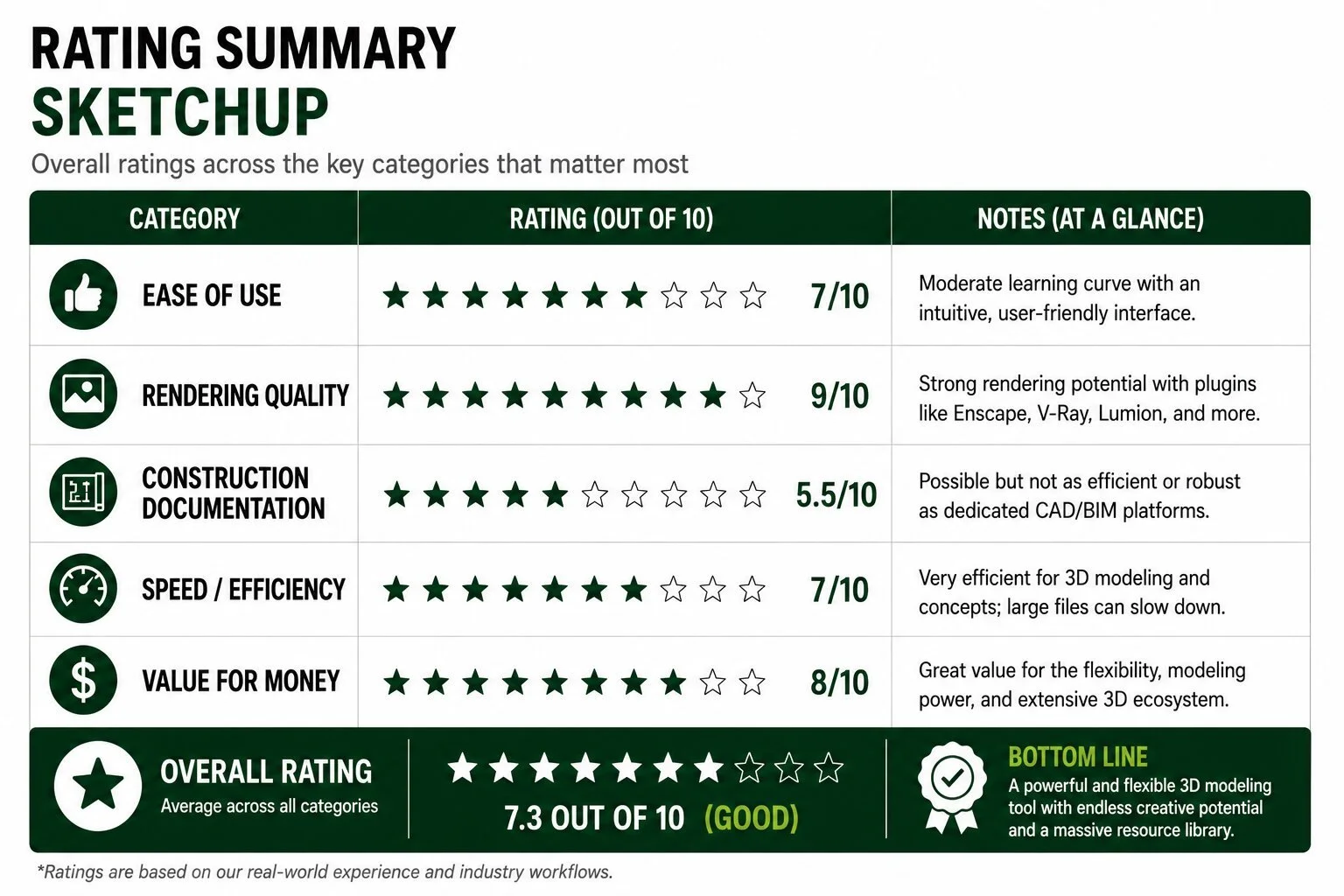
~$350–$750/year
Ease of Use
Moderate
Best For
3D modeling
Outdoor living design
Custom structures
Concept development
What We Like
SketchUp is one of the most versatile design tools available.
It’s incredibly flexible and allows designers to create:
highly customized structures,
complex outdoor spaces,
pergolas,
pavilions,
kitchens,
retaining walls,
and virtually any geometry imaginable.
The Warehouse ecosystem is also extremely valuable.
There are millions of downloadable models available that dramatically speed up workflow.
SketchUp also integrates well with rendering engines like:
V-Ray,
Enscape,
Lumion,
and Twinmotion.
What We Don’t Like
SketchUp can become messy very quickly without disciplined file organization.
Large projects can also become heavy and unstable.
Out-of-the-box rendering quality is weak unless paired with third-party rendering software.
Construction documentation is possible but not nearly as efficient as AutoCAD or Vectorworks.
5. AutoCAD
Approximate Cost
~$2,000/year
Ease of Use
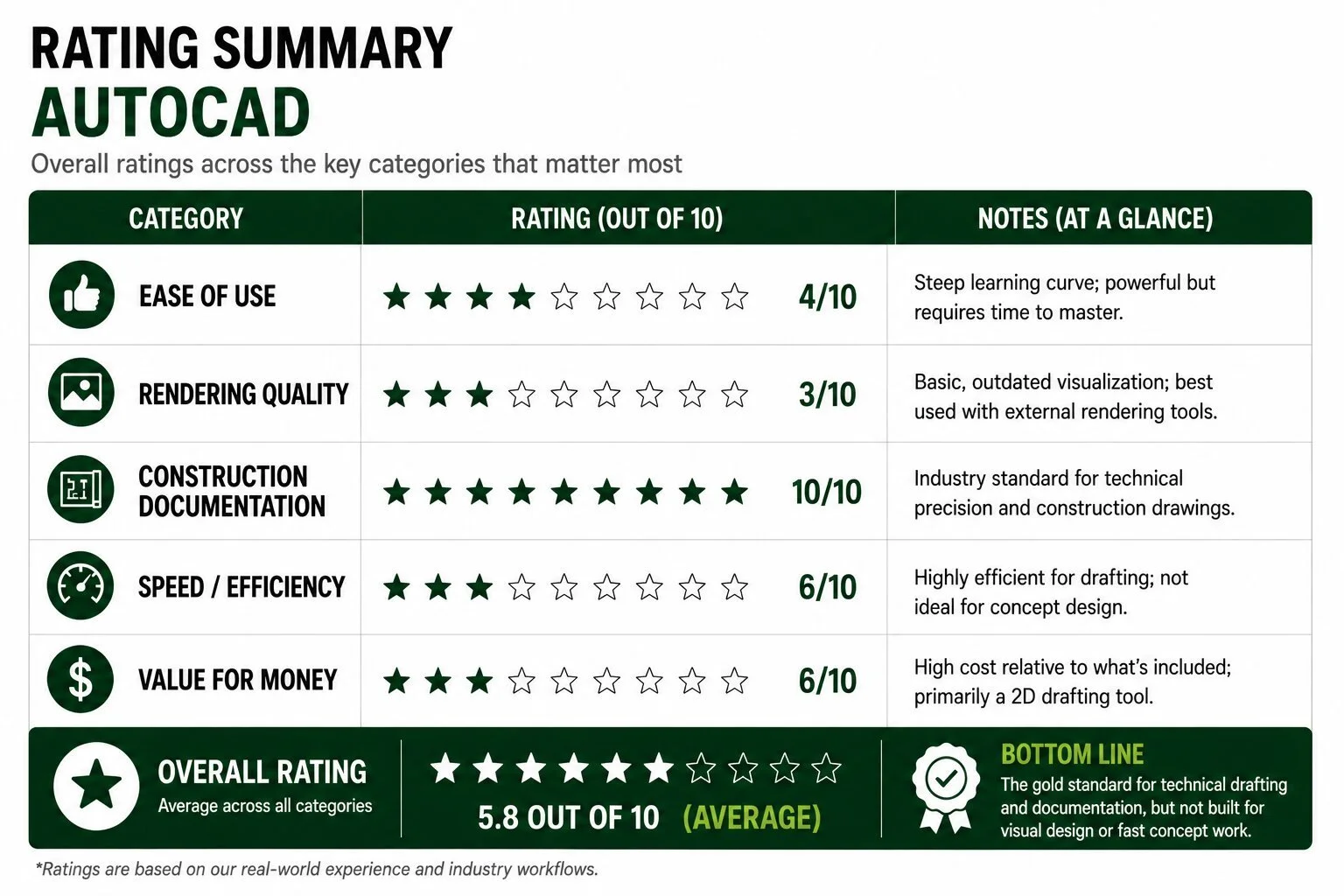
Difficult learning curve
Best For
Construction drawings
Technical plans
Site plans
Detailed documentation
What We Like
AutoCAD remains the gold standard for technical drafting.
Nothing really matches its precision for:
construction documents,
grading plans,
layout plans,
permitting plans,
utility plans,
and detailed technical workflows.
For firms producing highly technical documentation, AutoCAD is still incredibly powerful.
What We Don’t Like
The learning curve is steep.
For many contractors, AutoCAD can feel overly technical and inefficient for conceptual design work.
Visualization capabilities are also weak without additional rendering tools.
It’s more of a drafting engine than a presentation platform.
6. Vectorworks Landmark
Approximate Cost
~$2,000–$3,500+
Subscription options available
Ease of Use
Advanced/intermediate
Best For
Landscape architecture firms
BIM workflows
Complex site design
Integrated modeling + documentation
What We Like
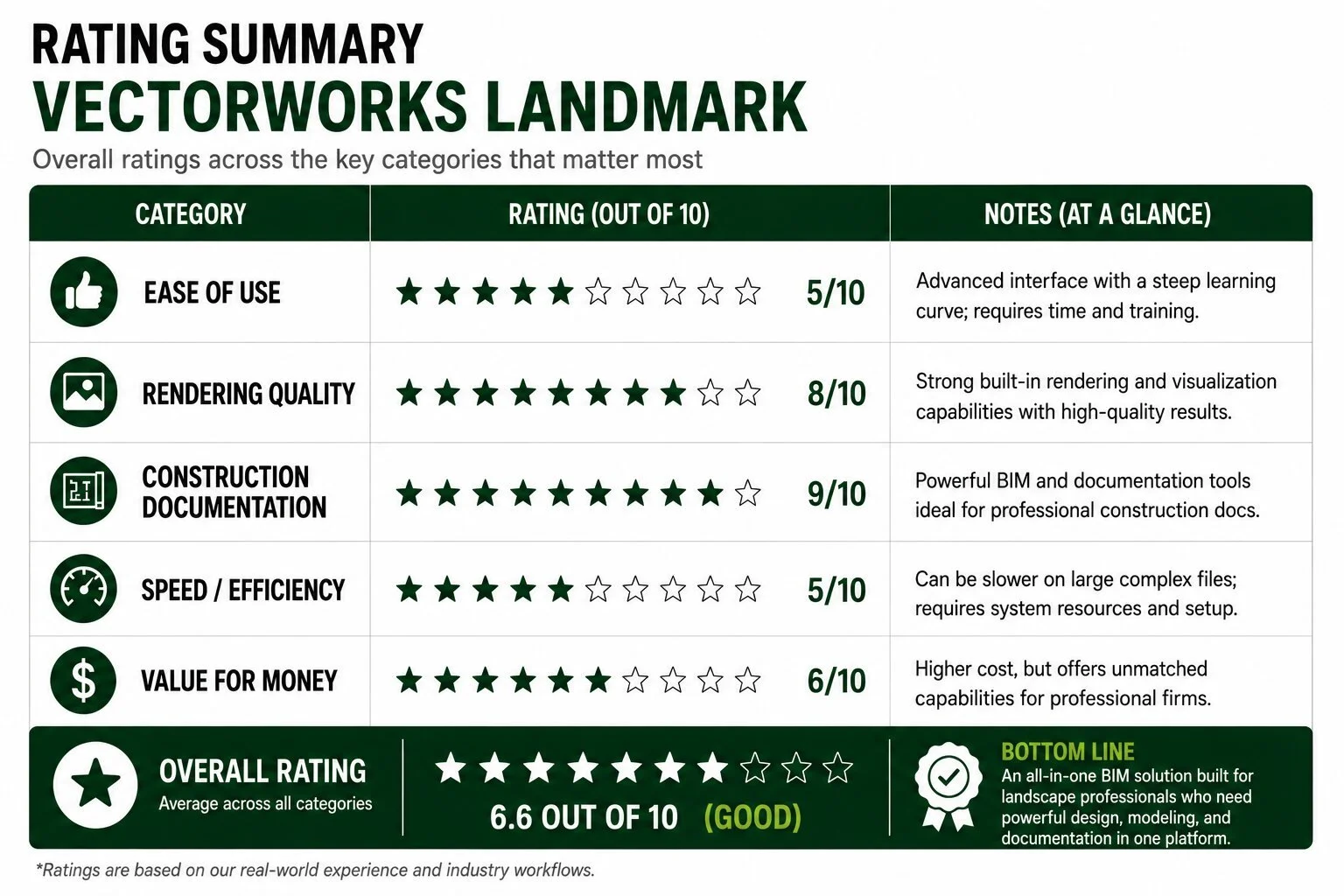
Vectorworks is incredibly powerful.
It combines:
modeling,
drafting,
BIM,
rendering,
and site design
…into one ecosystem.
For large-scale professional landscape architecture firms, it can be an extremely efficient all-in-one platform.
The site modeling tools are especially strong.
What We Don’t Like
The learning curve is substantial.
The interface can also feel overwhelming for smaller contractors or fast-moving design-build firms.
Performance can suffer on large files, and onboarding new team members can take significant time.
So Which Landscape Design Software Is Best?
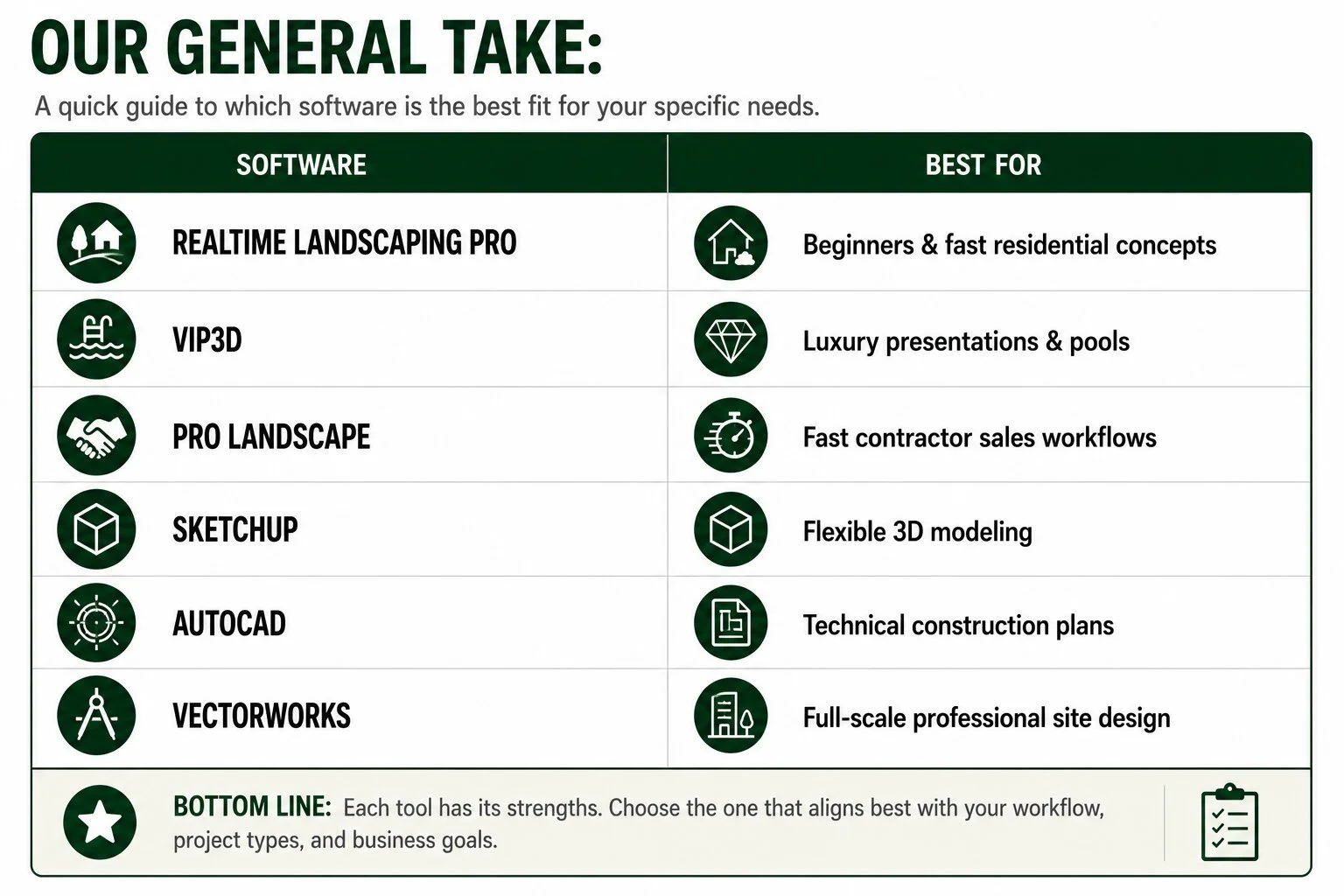
The answer depends entirely on:
your company size,
workflow,
project type,
technical needs,
and presentation standards.
What We Use at SCAPES
In short, we use a combination of Realtime Landscaping Architect, Sketchup, and Lumion (read more here about Sketchup rendering enhancements). At SCAPES, we believe the best workflow usually combines multiple software platforms together.
Why?
Because the landscape industry requires:
sales presentations,
photorealistic visualization,
technical construction documentation,
fast revisions,
and scalable workflows.
Very few programs truly excel at all of those simultaneously.
The most efficient design firms typically build systems around:
speed,
communication,
visualization,
and construction clarity.
That matters far more than simply using the “most advanced” software.
Recap
Landscape design software continues evolving rapidly — especially with:
AI-assisted rendering,
real-time visualization,
cloud collaboration,
and photorealistic rendering engines.
But software alone does not create great landscape design.
The best designs still come from:
construction knowledge,
creativity,
grading understanding,
spatial planning,
lighting expertise,
and real-world installation experience.
The software is simply the tool.
The design thinking behind it is what truly matters.
About the Author
With a diverse background as an owner of both a landscape design/build business and landscape maintenance operation as well as a formal education in Landscape Design from Penn State, Kevin now spends his days helping SCAPES lead the charge in the internet landscape design space. The classic kid-mowing-lawns story turned into a passion for the landscape profession for Kevin, and you may even hear him tell you that landscaping is about all he is good for! Have a question about something you just read? Reach out to Kevin directly at kevin@scapesdesigns.com and he will undoubtedly prove how serious SCAPES is about delivering a delightfully personal experience.
