
6 Min. ReadWhat We Actually Like (and Don’t Like) About the Best Plugins for Sketchup Rendering Enhancement
If you use SketchUp for landscape design, you already know how powerful it is for quickly building outdoor living concepts, patios, pools, planting plans, and full property visualizations.
But raw SketchUp models only go so far.
To create the highly realistic visuals clients expect today, most professional landscape designers pair SketchUp with rendering plugins or external rendering software. These tools add realistic lighting, shadows, textures, reflections, vegetation, weather effects, water movement, and atmosphere to transform basic 3D models into immersive presentations.
At SCAPES, we use rendering software daily to help contractors present projects more professionally and close larger outdoor living projects.
Below are our picks for the best SketchUp rendering enhancements currently used in the landscape design industry.
1. Lumion
Approximate Cost
~$1,750/year for Lumion Standard
~$3,300/year for Lumion Pro
Ease of Use
Very beginner-friendly compared to most advanced rendering engines
Best For
Landscape contractors Outdoor living designers High-end residential presentations Pool and patio visualization Landscape lighting renderings Sales presentations and walkthroughs
What We Like
Lumion is probably the best overall rendering software currently available for landscape contractors using SketchUp.
At SCAPES, it’s the rendering platform we personally use because it strikes an excellent balance between:
realism
speed
usability
presentation quality.
The software excels at quickly transforming basic SketchUp models into highly realistic outdoor environments. It’s especially strong for:
pools
patios
outdoor kitchens
planting visualizations
lighting effects
water features
luxury outdoor living spaces
One of Lumion’s biggest strengths is atmosphere. The lighting, shadows, weather effects, vegetation movement, reflections, and environmental realism create presentations that feel immersive and emotional for clients.
Compared to many advanced rendering engines, the learning curve is also surprisingly manageable.
What We Don’t Like
The biggest drawback is hardware demand and cost. Lumion requires a powerful graphics card and high-end computer to run smoothly on large projects.
The annual subscription pricing is also significantly higher than many competing rendering tools.
While rendering quality is excellent, some ultra-close material realism can still fall slightly short of the absolute photorealism achievable in V-Ray.

2. V-Ray
Approximate Cost
~$466/year for V-Ray Solo
~$694/year for V-Ray Premium
Ease of Use
Moderate to advanced learning curve
Best For
Luxury landscape visualization
High-end marketing imagery
Architectural visualization firms
Photorealistic still renderings
Advanced rendering specialists
What We Like
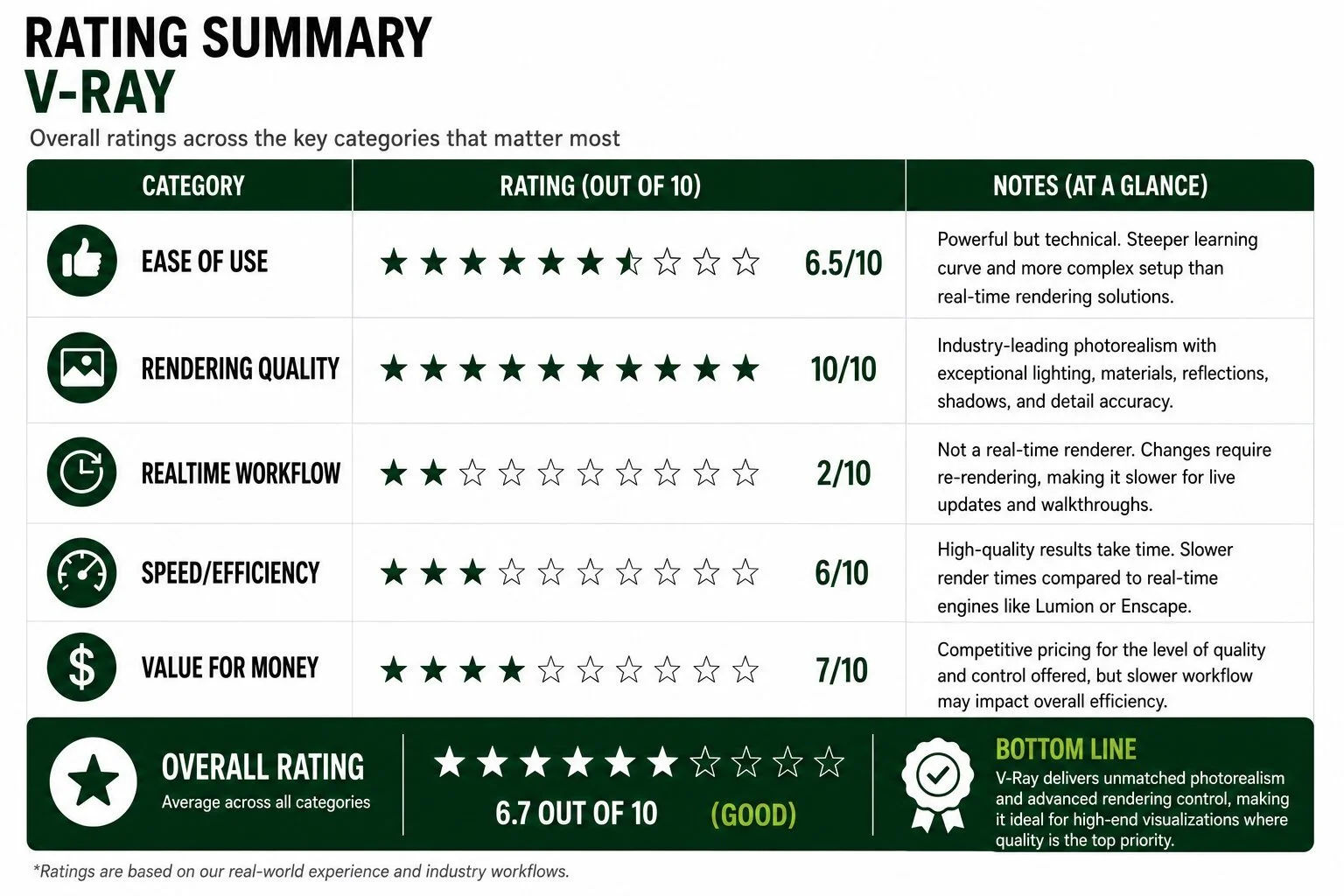
V-Ray is arguably the gold standard for pure photorealism.
When configured properly, the realism can become almost indistinguishable from professional architectural photography.
The lighting engine is incredibly powerful and gives designers advanced control over:
reflections,
shadows,
materials,
texture realism,
camera settings,
and global illumination.
For luxury landscape presentations and high-end marketing visuals, V-Ray can produce absolutely stunning results.
Material realism is one of the biggest advantages.
Stone, concrete, wood, stucco, water, and metal surfaces often appear more physically accurate than many real-time rendering engines.
What We Don’t Like
The learning curve is significantly steeper than Lumion or Enscape.
Rendering workflows can feel technical and time-intensive, especially for contractors who are not full-time visualization specialists.
Rendering times are also much slower compared to real-time engines.
For fast-paced landscape sales workflows where revisions happen constantly, the slower rendering pipeline can become frustrating.
3. Enscape
Approximate Cost
~$478/year fixed-seat license
Floating licenses available at higher pricing
Ease of Use
Extremely beginner-friendly
Best For
Fast-paced design workflows
Live client presentations
Real-time walkthroughs
Collaborative design meetings
VR presentations
Landscape contractors prioritizing speed
What We Like
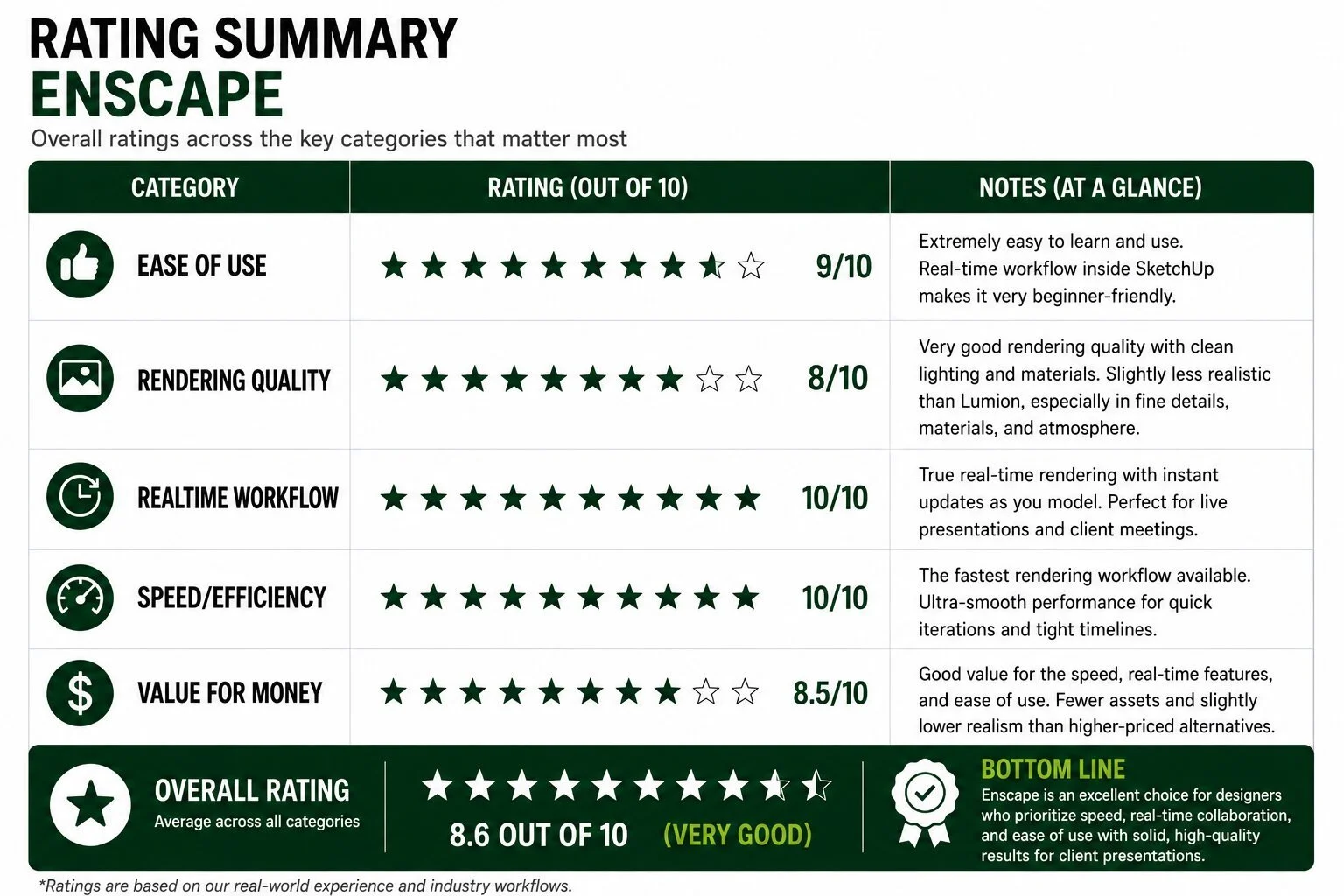
Enscape is one of the fastest and easiest rendering platforms to integrate into a SketchUp workflow.
Unlike many rendering engines that require exporting models into separate software, Enscape works almost entirely inside SketchUp in real time.
As you modify the model, the rendering updates instantly.
That speed creates major advantages for:
client meetings,
design revisions,
live walkthroughs,
and collaborative presentations.
The workflow is incredibly smooth and intuitive.
For contractors who prioritize efficiency over ultra-high-end cinematic realism, Enscape is a fantastic option.
VR integration is also one of the strongest features.
What We Don’t Like
While Enscape looks very good, the rendering quality still falls somewhat short of Lumion and V-Ray for highly polished luxury visualizations.
The asset library is smaller than Lumion’s, particularly for landscape-specific vegetation and outdoor living assets.
Some renderings can also feel slightly “clean” or artificial compared to the depth and atmosphere achievable in more advanced rendering engines.
So Which Sketchup Rendering Enhancement is best?
The best rendering software depends on your priorities.
If you want the best overall balance of realism, workflow speed, and outdoor visualization capability, Lumion is hard to beat.
If your priority is achieving the most photorealistic still imagery possible, V-Ray remains one of the strongest rendering engines available.
If speed, collaboration, and live walkthroughs matter most, Enscape offers one of the fastest and simplest workflows in the industry.
For most landscape contractors, the goal is not just creating beautiful images — it’s helping clients emotionally connect with the project before construction even begins. That’s where rendering software becomes incredibly valuable.
What We Use at SCAPES
At SCAPES, we use Lumion as our primary rendering platform alongside SketchUp. After working with multiple rendering workflows, we’ve found Lumion offers the best balance between:
realism,
speed,
usability,
and presentation quality.
For landscape contractors, fast revisions and efficient workflow matter just as much as realism — and Lumion handles both extremely well.
We especially like it for:
outdoor living renderings,
landscape lighting visualization,
pools and water features,
nighttime scenes,
and cinematic walkthroughs.
While V-Ray can achieve slightly higher photorealism and Enscape offers incredible speed, Lumion provides the best overall combination of quality and day-to-day usability for our workflow at SCAPES.
Recap
SketchUp remains one of the best landscape design platforms available, but rendering enhancements are what truly bring projects to life.
Whether you choose Lumion, V-Ray, or Enscape, pairing SketchUp with professional rendering software can dramatically improve presentation quality and help landscape contractors create more immersive client experiences.
At SCAPES, we provide professional 2D plans, 3D landscape design, and photorealistic rendering services for landscape contractors nationwide.
About the Author
With a diverse background as an owner of both a landscape design/build business and landscape maintenance operation as well as a formal education in Landscape Design from Penn State, Kevin now spends his days helping SCAPES lead the charge in the internet landscape design space. The classic kid-mowing-lawns story turned into a passion for the landscape profession for Kevin, and you may even hear him tell you that landscaping is about all he is good for! Have a question about something you just read? Reach out to Kevin directly at kevin@scapesdesigns.com and he will undoubtedly prove how serious SCAPES is about delivering a delightfully personal experience.
